Godot Project Breakdown
Godot VSCode Gamedev Programming
VSCode extension for managing Godot projects
Content
Godot Project Breakdown 🤖

This is an VSCode extension that gets all .gd files in your Godot 3.X project , analyze them and gives a overview of all of them in a single file.
For each .gd file, it shows its private or public* variables and methods, defined signals, node references and enums.
* Private and public fields do not exist (at least at the moment) in gdscript, but if you use the prefix “_” to differentiate private fields (using “_”) from public (without “_”), it will take it into account.*
I made this extension long time ago, when Godot didn’t even support C#. So, at least for the moment, it only works with gdscript (.gd) files and with Godot 3.X.
Reasons & Motivation
I made this extension for myself, to easily track and update every change in my project, so I could easily manage/update my project documentation (in my case, an UML diagram for my game). Instead of keeping track of every change manually, I just generate a new file, compare it to the previous version (using version control), and effectively update my documentation.
I released the extension just in case is helpful for somebody else.
Usage 🔧
Prerequisites: this extension requires Godot tools
- Download latest version and install it
If you are using a Godot Tools version below 1.X.X, download version 1.0.1
If you are using Godot 3.2 or above and a Godot tools version equal or above 1.X.X download latest version
To install the .vsix files, go to
extensions -> ... -> "Install from vsix"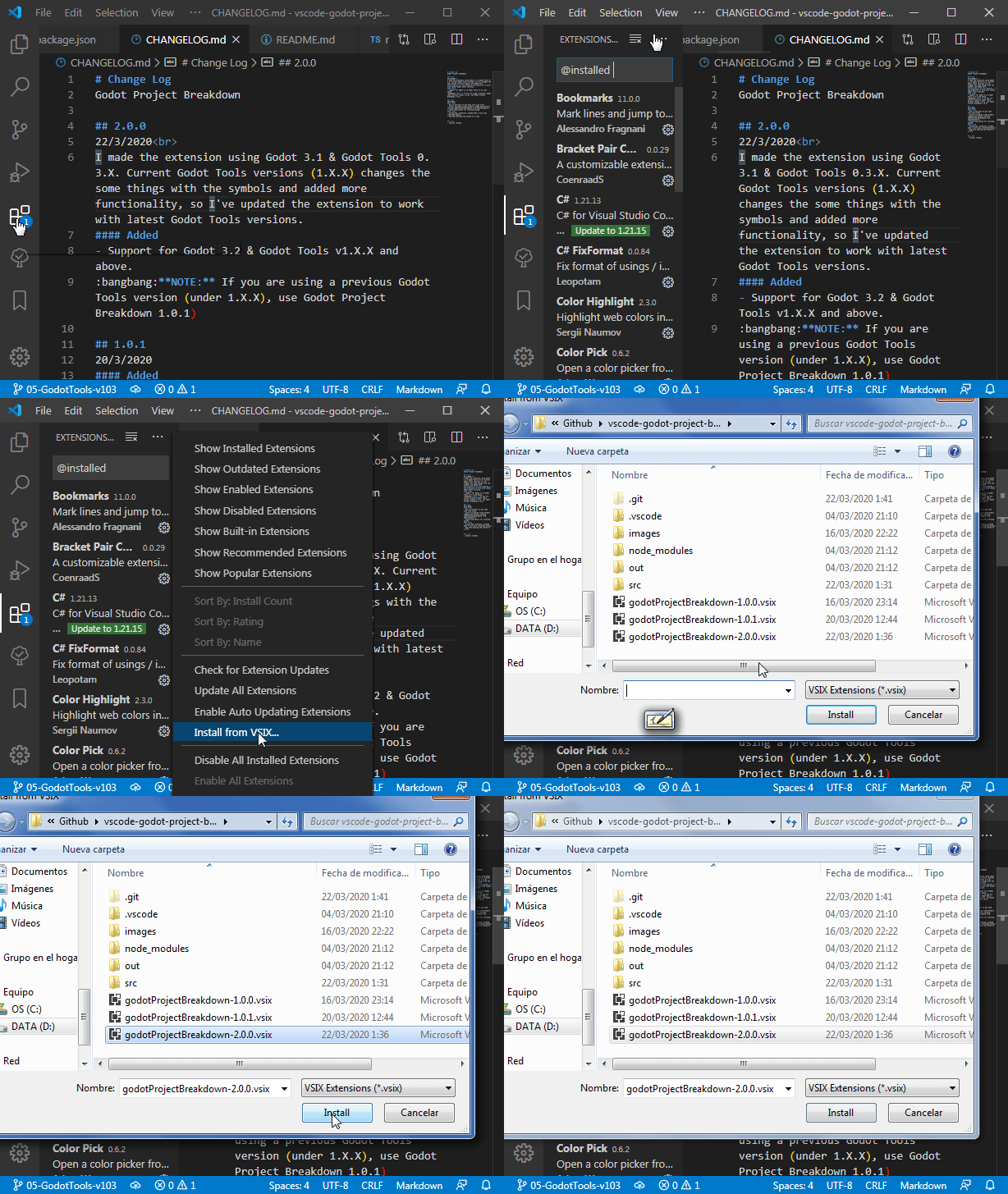
Open command palette (F1)
Type
Generate breakdown fileExecute command
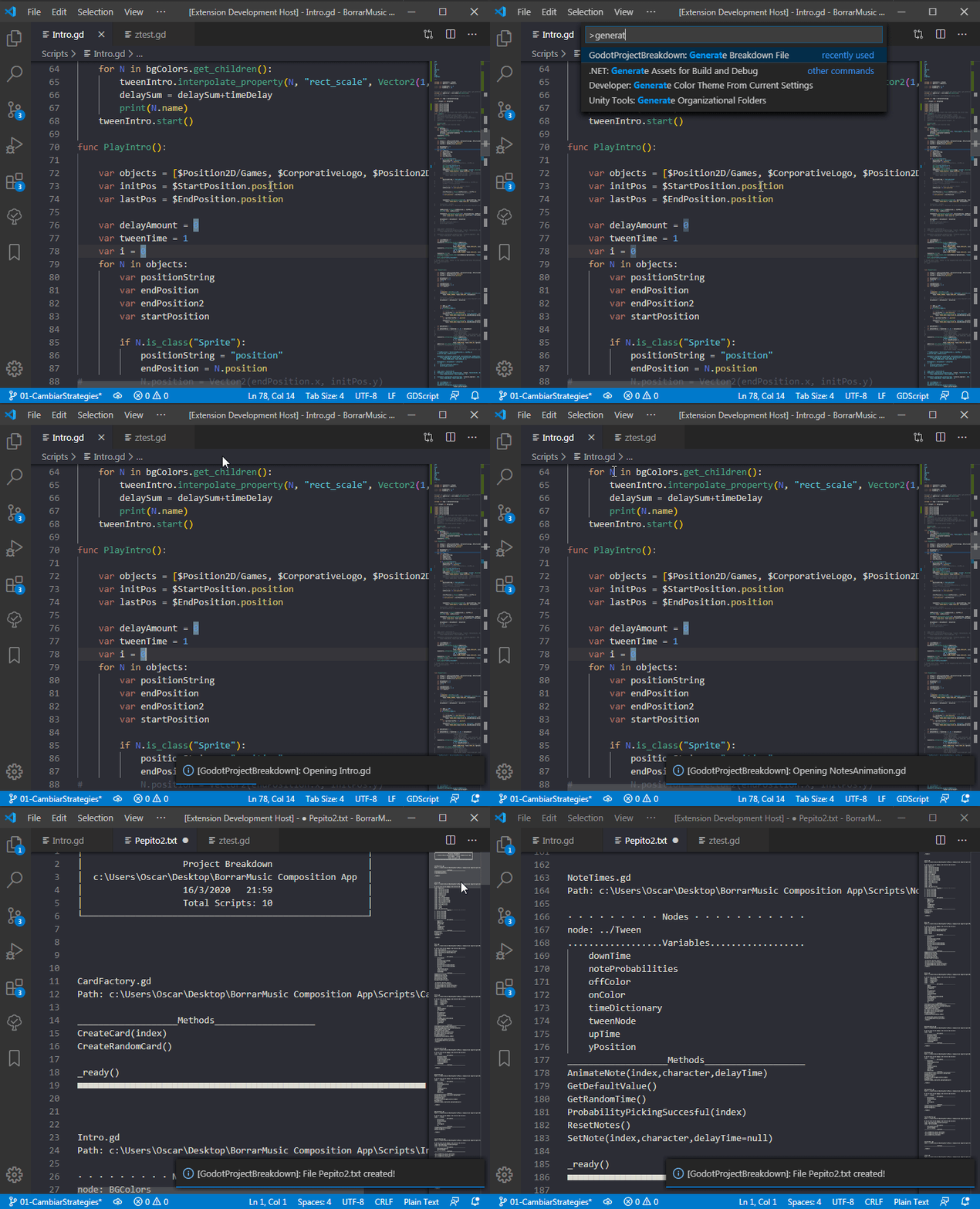
- Done! 🥳
Extension options ⚙
The result file is highly customizable to suit your needs. You can specify wich data to show, in wich order, and how.
Most options are self explanatory with its setting’s description. But some of them:
godotProjectBreakdown.file.orderThis is one of the most important settings. Is astringthat specifies the data to show and the order. Its default value isf# p ne svm
Each character stands for a data in file:
n - Node referencess - Signalsv - Variablesm - Methodsp - Path of the filef - File Namee - Enums# - Class Comments. On any gdscript, you can put the text you want to show in the file if you include it between ###\ and /###. For example:
###\ (Yor comment here) /###
(Empty space) - Line separation (equals to \n)
godotProjectBreakdown.file.sortScriptsByAllows you to sort the scripts by their path, name or extended node/script.godotProjectBreakdown.separator.{...}Astringthat allows you to add a custom header for each property.godotProjectBreakdown.prefix.{...}Allows you to add a custom prefix for each property.godotProjectBreakdown.file.ignoreFoldersA Glob Pattern for ignoring folders/files that you don’t want to show in the breakdown file.
Its default value is "**/addons/**", wich means that will ignore files on anny “addons” folder.
If Glob Patterns are new to you, this tool is very useful to ensure your glob pattern is
godotProjectBreakdown.file.showEnumValuesAboolfor showing (true) or not (false) the enum values for each enum.
Possible future improvements
Analyze all the .tscn files in the project for getting more information, like… signals connected via editor.
Maybe I’ll upload the extension into the vscode marketplace in the future.
FAQ
Which is the current state of the extension?
The extension was made originally for Godot 3.X.
At the moment I’m not continuing with the future development of this extension. It was my first (and only) VSCode extension and at the time I’m writing this (5 years after I made the extension), tools changed (TypeScript changed, VSCode Extensions’ API changed, Godot changed, etc.) and I don’t have the time, energy and motivation for continuing with this.
Logo license ©
The extension logo uses and modifies the original Godot logo by Andrea Calabró.
Its License: Godot Logo (C) Andrea Calabró Distributed under the terms of the Creative Commons Attribution License version 3.0 (CC-BY 3.0) https://creativecommons.org/licenses/by/3.0/legalcode.